
Delve Forging Guide: What the Forge Is and How Crafting Works
The Forge is Delve's gear workshop: craft ores into equipment through the FORGE panel's tabs, then use the UPGRADE panel to improve gear you already own.
Quick answer
The Forge is Delve's gear station: ores you mine underground are forged into equipment there. Crafting runs through the FORGE panel, whose tabs — All, Craftable, Recipes, Accessories, Helmets and Backs — sort what you can make, and a separate UPGRADE panel in the forge area improves gear you already own instead of creating something new.
- FORGE panel tabs: All, Craftable, Recipes, Accessories, Helmets and Backs.
- Crafting turns mined ores into new gear.
- The UPGRADE panel raises an existing weapon's +level with a CHANCE percentage, stat previews and protection options.
Delve's own description sums up the Forge's job: "Mine rare ores, forge and upgrade your gear." Ores you dig up underground get converted into gear, and that gear is what keeps you alive when monsters and bosses show up. The Forge is where that conversion happens — it is the step that turns mining results into fighting power, which is why it sits at the center of the game rather than off to the side.
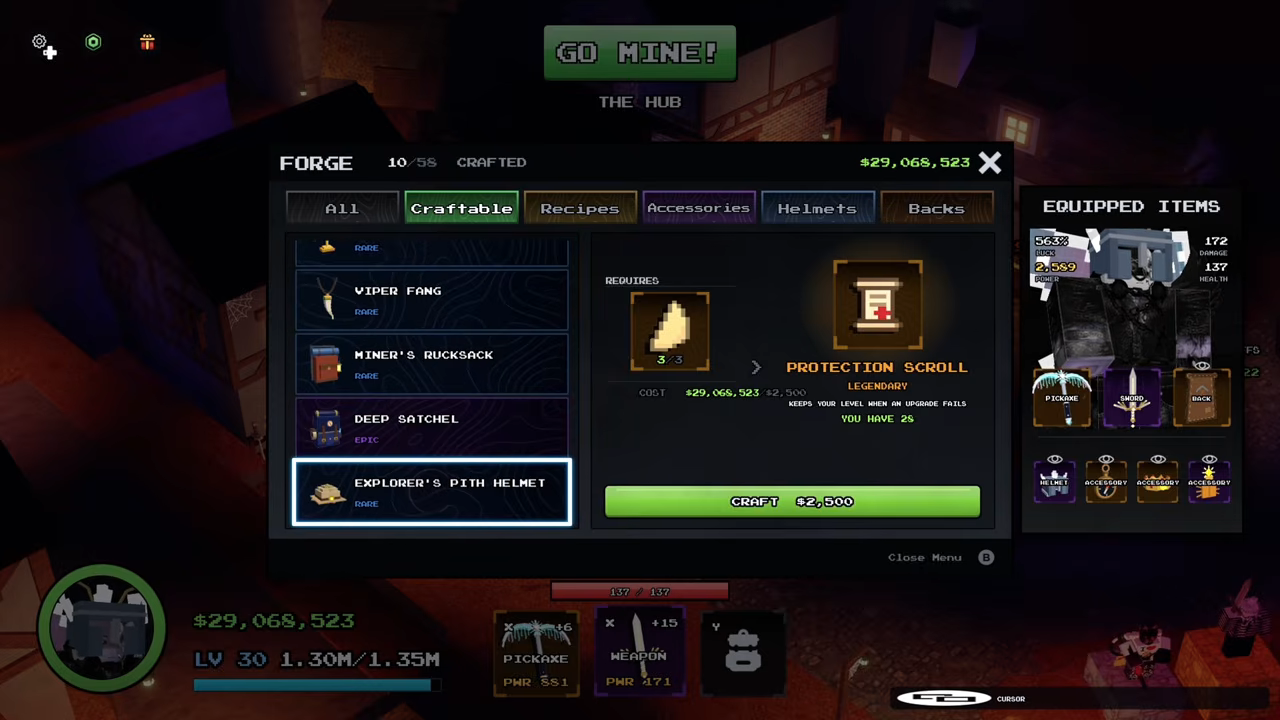
The FORGE panel and its tabs
Crafting lives in the FORGE panel, and its tabs are how you browse the crafting categories:
| Tab | What it shows |
|---|---|
| All | The whole menu in one list |
| Craftable | Only craftable items |
| Recipes | Only recipes |
| Accessories | Accessories-slot gear |
| Helmets | Helmet-slot gear |
| Backs | Back-slot gear |
Accessories, Helmets and Backs split gear into slot categories, so when you already know you need a helmet or a back item, you can jump straight to that group instead of scrolling through the full menu.
Crafting vs. upgrading: two panels, two jobs
The forge area does two different things in two different panels, and knowing which one you need saves time. Crafting creates gear you don't have yet. The UPGRADE panel improves gear you already own — the example panel was built around a BOREALIS sword, with its level shown as +2 >>> +3 on the way up.
Decision guide
Inside the UPGRADE panel
You can recognize the upgrade half at a glance: the panel is titled after the item it is improving, like UPGRADE BOREALIS. Each element on it answers one question about the attempt you're about to make:
| Panel element | How to read it |
|---|---|
| Title (e.g. UPGRADE BOREALIS) | Which owned weapon you are improving |
| Level row (e.g. +2 >>> +3) | The current level and what a successful upgrade turns it into |
| CHANCE | The odds the attempt succeeds — the example +2 to +3 upgrade showed 100%, while levels +6 through +15 showed chances falling from 56% to 20% |
| Stat deltas | Before and after numbers, e.g. PWR 151 to 159, alongside SPEED, CRIT and CRIT DMG |
| Upgrade button (e.g. UPGRADE 551K) | Confirms the attempt and shows what it costs |
| PROTECTED checkbox | Flags the attempt as protected, using a protection scroll |
| SEALED option | Labeled +20% and a fail won't drop your power |
The percentages and the 551K price are examples of what the panel displayed, not fixed rates — expect your own numbers to differ. The shape of those examples still tells you what to watch for: early upgrades ran at 100% chance, while higher levels carried real failure risk, and that is exactly what the protection options respond to.
The upgrade panel also showed a RUNES tab. Runes are their own weapon system rather than part of crafting, and they are covered separately in the Delve runes guide along with the rune tiers breakdown.
Where the Forge fits in the rest of the game
The Forge is the middle link of Delve's core loop. You mine ores in the game's areas, the Forge converts them into equipment, upgrades push that equipment's numbers higher, and the finished gear is what keeps you alive against the monsters and bosses you meet while pushing deeper.
If you are just starting out, the Delve beginner guide walks the whole flow in order. For the inputs, the Delve mining guide and the Delve ores guide cover digging up the raw materials. For the outputs, the Delve gear guide and Delve weapons guide cover the equipment itself, and the Delve gear upgrade guide goes further into improving what you already own.
Related Guides
Gear Upgrades
Follow the upgrade path for weapons and armor, including costs, materials and sensible upgrade order.
Mining Loop: Ore to Gear
Master the mining loop from ore pickup to forge, and turn every run into real gear progress.
Gear: Slots & Upgrades
Understand every gear slot, how swapping works, and when upgrading beats buying new equipment.