
Delve Runes Guide: Where to Find Them, Rune Tiers and Weapon Upgrades
Your Delve runes live in the RUNES tab of your weapon's upgrade panel. Here is how to open it, which rune tiers exist (including Tier VI), and how runes fit into upgrading your weapon.
Quick answer
Your runes are managed from the RUNES tab inside your weapon's upgrade panel — for example, the UPGRADE BOREALIS panel for the Borealis Sword includes a RUNES tab next to its normal upgrade controls. Delve runes are named items with tier numbers, and Tier VI runes have been added to the game.
- Open the upgrade panel for your equipped weapon and switch to the RUNES tab.
- The panel shows your equipped weapon plus every rune you own, each with its name and tier.
- Pick a rune to see what it does — the panel's own hint reads 'PICK A RUNE TO SEE WHAT IT DOES'.
Where to find your runes
Your runes are managed from a RUNES tab inside the weapon upgrade interface: when you open the upgrade panel for your equipped weapon (the same screen where you pay to raise its upgrade level), a RUNES tab sits alongside the upgrade controls.
Opening that tab brings up the RUNES panel. It shows your currently equipped weapon — in recorded gameplay this was BOREALIS SWORD, TIER 1 SWORD - LEGENDARY — alongside your owned runes, each listed with its name and tier. Every rune appears with its name and tier, so you can tell a Tier IV Sage apart from a Tier III Midas at a glance. Names visible on that panel included Jackpot, Sage, Cleave, Frostbite, Expulsion, Shatter, Origin Lighting, Echo, Frenzy, Four-Leaf, Midas, Vampire and Stormblade.
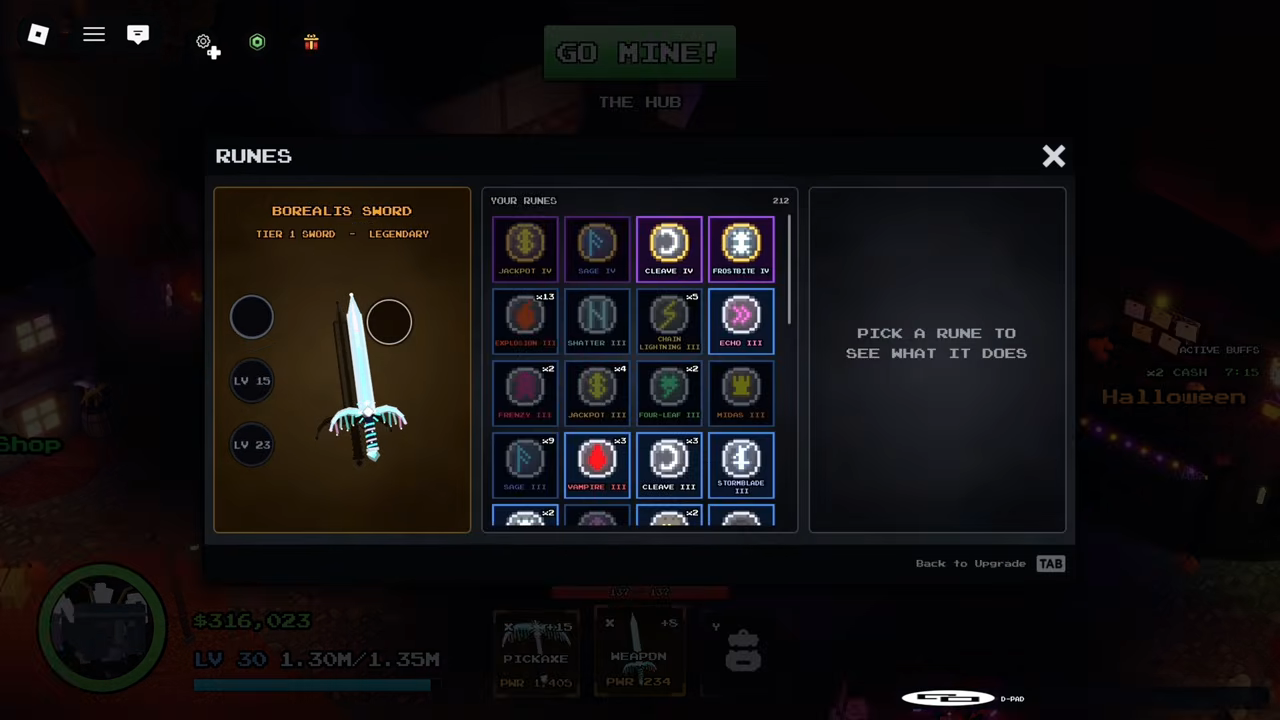
The panel also prints its own instruction: 'PICK A RUNE TO SEE WHAT IT DOES'. Selecting any rune in the list shows its effect, so you never have to guess what Cleave or Vampire actually does — the game tells you on the spot.
One caveat about the exact layout: the recording this panel view comes from was made before the update that reworked runes, so your RUNES tab may look somewhat different today. What to look for is the tab itself — runes are managed from your weapon's upgrade panel.
What rune tiers exist
Rune tiers are the Roman numerals after each rune's name, and the available game information confirms three tiers:
- Tier III and Tier IV — both appear in the RUNES panel footage: JACKPOT IV, SAGE IV, CLEAVE IV and FROSTBITE IV, plus a batch of III runes such as EXPULSION III, SHATTER III, ORIGIN LIGHTING III, ECHO III, FRENZY III, FOUR-LEAF III, MIDAS III, SAGE III, VAMPIRE III and STORMBLADE III.
- Tier VI — added to the game by the Infernia update, whose notes list 'Tier VI Runes Added'.
The roster keeps growing, too: the Abyss update added '8 New runes and stones'. No rune list is therefore complete for long — treat your own RUNES panel as the authoritative view of which runes and tiers you actually own.
How runes fit into upgrading your weapon
Runes share their home with weapon upgrades by design. The upgrade panel is where you raise a weapon's level the traditional way: on the Borealis Sword, the upgrade rows ran from +6 to +15 with success chances falling from 56% to 20%, a PROTECTED checkbox tied to protection scrolls, and an UPGRADE button costing in-game currency. The RUNES tab lives in that same panel, so pushing upgrade levels and managing runes are two halves of one weapon-improvement screen rather than two separate systems.
What a rune contributes is shown in-game rather than on its face: pick one on the RUNES tab and the panel displays what it does. Keep in mind that the whole rune system was reworked in the Vesper/Arena update — the same patch that added Loadouts and raised weapons up to level 100 — so rune effects described in older videos or guides may no longer match your panel.
That placement tells you where runes sit in the bigger picture: rune management lives on your weapon's improvement screen, right next to its regular upgrade levels. For the full upgrade path — costs, chances and protection — see the gear upgrade guide, and for a tier-by-tier look at individual runes, see the rune tiers page.
Expect rune changes — Delve is in Alpha
Delve carries the [Alpha Release] flag and is still under heavy development. Runes have already been reworked once, Tier VI runes were added, and the Abyss update shipped another batch of new runes and stones, so the panel layout, rune names and rune effects can all change between patches. If your RUNES tab looks different from anything described in a guide, trust your panel — and check the Updates page to see what the latest patch changed.
Related Guides
Rune Tiers I-VI
Read the I-VI numerals on any rune and know exactly how strong it is at a glance.
Gear Upgrades
Follow the upgrade path for weapons and armor, including costs, materials and sensible upgrade order.
Stones: Confirmed Facts
Read what the developers confirmed about stones today and what remains unknown before you invest.