
Delve Gear Upgrade Guide: How to Upgrade Weapons and Gear
How to upgrade gear you already own in Delve: the Forge UPGRADE panel, upgrade costs, success chances, stat gains, and protection from failed upgrades.
Quick answer
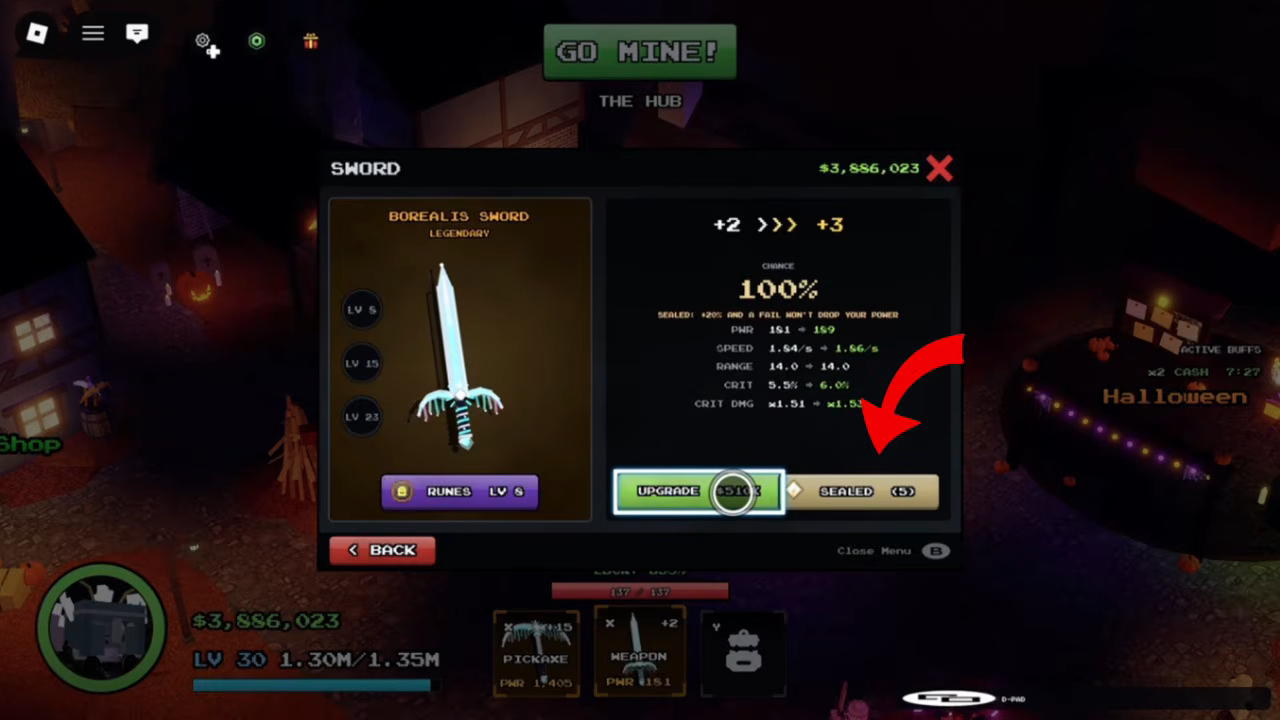
You upgrade gear you already own in Delve at the Forge's UPGRADE panel: select the item, check the success chance and stat gains shown for the next level, then press the UPGRADE button to pay the displayed price. The early step shown (+2 >>> +3) had CHANCE 100%, while the listed levels +6 to +15 can fail, sliding from 56% down to 20% — the panel offers protection options for those riskier attempts.
- The observed +2 >>> +3 step on a BOREALIS sword cost 551K.
- The observed +2 >>> +3 step showed CHANCE 100%; the listed levels +6 to +15 slid from 56% down to 20%.
- Sealing costs extra but, per its label, a fail won't drop your power.
Delve is a Roblox mining RPG built around mining rare ores, forging and upgrading gear, and fighting monsters and bosses — upgrading what you already own is a core part of getting stronger. This guide covers the whole upgrade step: where it happens, what it costs, what it changes, and how to protect an item when the attempt can fail. If you're brand new to the game, the Delve beginner guide covers the basics first.
Where you upgrade: the Forge's UPGRADE panel
Head to the Forge and open the UPGRADE panel for an item you own. The panel lays out everything about the next step before you spend anything:
- Current and next level, written like +2 >>> +3
- CHANCE, the success chance for that step
- Stat deltas, exactly what each stat gains if the step succeeds
- The UPGRADE button with the price, e.g. UPGRADE 551K
A RUNES tab sits alongside the upgrade controls in the same panel. That handles the separate rune system, which the Delve runes guide covers in detail.
What an upgrade costs
The price is printed on the button itself, so you always see it before committing. In the recorded example, moving the BOREALIS sword from +2 to +3 was priced at 551K — the panel didn't label the currency, but the amount shown is what the button charges. Costs are per level and per item, so a different piece of gear or a higher upgrade level will show its own number. Check the button each time rather than assuming yesterday's price still applies.
What an upgrade changes
Each step applies the stat gains listed in the panel. For the recorded BOREALIS SWORD — a Tier 1 Legendary sword — the +2 to +3 step read:
| Stat | At +2 | At +3 |
|---|---|---|
| PWR | 151 | 159 |
| SPEED | 1.64/s | 1.66/s |
| CRIT | 5.0% | 6.0% |
| CRIT DMG | x1.51 | x1.5x |
That's roughly +8 PWR plus small gains to speed, crit chance and crit damage from a single step. Other items have their own stat deltas, and the panel lists them for the next level before you buy, so you can weigh whether a step is worth its price. If you're still deciding which items to invest in at all, the Delve gear guide and the Delve forging guide cover the acquisition and crafting side.
Success chance: the observed early step was guaranteed, higher listed levels can fail
The one early step shown carried no risk — the +2 >>> +3 row read CHANCE 100%. Past it, the listed chances drop below 100% and keep falling as the level climbs: the same panel listed levels +6 through +15 with chances sliding from 56% down to 20%.
In practice, that means the one early upgrade shown (+2 >>> +3) is a guaranteed step, while pushing an item toward +15 becomes a series of attempts where most can fail. That risk is exactly what the protection options below are for.
Protecting an item from a failed upgrade
The upgrade panel offers failure protection in two forms:
- PROTECTED checkbox — associated with a protection scroll.
- SEALED (5) button — its own label reads "SEALED: +20% AND A FAIL WON'T DROP YOUR POWER". Sealing costs extra, and a failed attempt won't lower the item's power.
The exact cost of sealing wasn't displayed alongside the upgrade price in the observed panel — the SEALED button itself is where that deal is presented in-game.
Delve is an Alpha game — recheck before trusting exact numbers
Delve's official page marks it [Alpha Release] and "still under heavy development", with SHUTDOWN = UPDATE every time the game patches. The panel described here was observed in a build from around the game's Halloween update, so exact prices, chances and even button labels can shift between updates. The workflow doesn't: open the UPGRADE panel, read the chance and stat deltas, decide whether to seal or protect, and pay only what the button shows.
Older videos describe a different upgrade system
At least one older guide video shows a different upgrade area where items were upgraded with gold, and reaching "grade two" on an item also required gems. That description comes from an earlier build of Delve, not the current Forge panel — the two describe different versions of the game and shouldn't be combined into one procedure. If a video's upgrade screen looks nothing like the panel described above, it's showing outdated footage; follow what your in-game panel shows instead.
Related Guides
Forging & Crafting
Learn what the forge does, which materials crafting needs, and how to turn ores into better gear.
Runes & Rune Tiers
Find where runes drop, how rune tiers work, and which weapons are worth socketing first.
Rewards & Uses
Find out which materials and rare drops matter, where they come from, and what each one is used for.