
Delve Shop Guide: How to Open the Shop With the B Key and What It Sells
Press B to open the Shop in Delve. Here's what the shop sells — pickaxes, weapons, armor — how restocks work, and how to sell your dungeon loot there.
Quick answer
Press B on your keyboard to open the Shop in Delve. The shop panel is where you buy pickaxes and weapons — a guide also reports armor there — its stock reportedly rotates every few hours, and it doubles as the place to sell the items you collect in dungeon runs.
- B is the official Open Shop key
- Observed shop categories: PICKAXES and WEAPONS
- Stock reportedly changes every few hours
- You can sell dungeon items at the shop
The Shop is Delve's standing store — in gameplay it appears as a shop NPC panel — and B is its official shortcut. Below is how to open it, what it stocks, how restocks work, and which other "shop" in Delve you shouldn't confuse it with.
Opening the shop with the B key
Press B to open the Shop. "B to Open Shop" is listed in Delve's official controls on its Roblox page (the game by Treasure Goblin), alongside the game's other shortcuts:
| Key | Action |
|---|---|
| Q / Space | Dash |
| T | Open Inventory |
| B | Open Shop |
| H | Hide Helmet |
One mix-up to avoid: T opens your Inventory, not the shop. If the panel that opens shows your own gear instead of a store list, you pressed T — close it and press B instead.
If you're just starting out, the Delve beginner guide explains how the shop fits into the wider game loop.
What the shop sells
The shop panel lists its goods under two item categories: PICKAXES and WEAPONS. In one recorded gameplay session, the panel showed exactly those two categories and the player bought a Borealis Sword straight from it — so buying from the shop is a real, working part of the game, not just something a guide mentions.
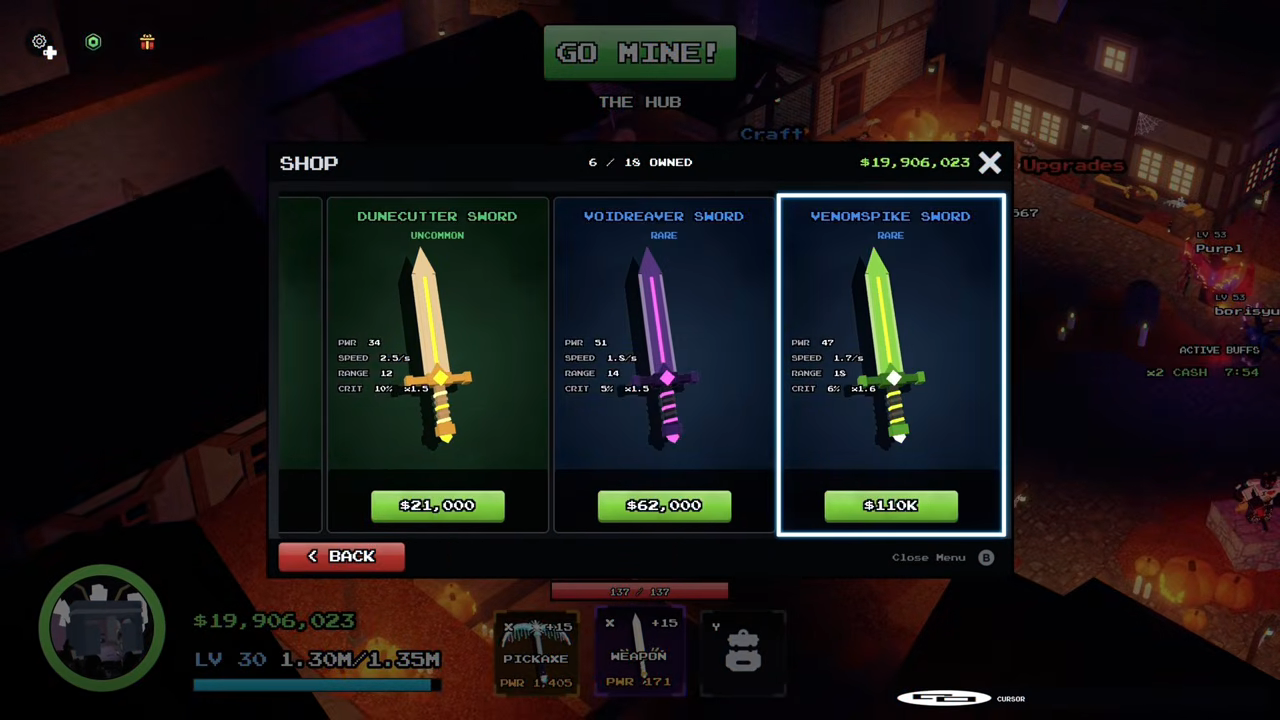
A guide creator adds more to look for: the shop is where you can get armor, and it names swords such as the Crypt Long Lord Blade and the Crypt Greatsword as buyable there. Which swords are actually on the shelf can shift, because the specific swords named may depend on the shop's current rotation.
That gives you two shopping directions: a new pickaxe for your mining setup (the Delve mining guide and ores guide cover what you're digging toward), or a new weapon for combat (the Delve weapons guide and gear guide put shop swords in context).
Restocks and selling dungeon loot
The stock rotates. One guide creator describes the shop's stock as restocking "to change every like few hours" — the narrator's own approximation, not a confirmed timer. Treat "every few hours" as a rough rhythm: if the sword or pickaxe you want isn't listed right now, the current rotation may simply not be showing it, so reopen the shop later rather than assuming the item is unavailable.
The same creator notes a second use for the panel: you can sell the items you get from the dungeon there. That makes the shop a natural stop after Delve dungeon runs, not only before them. No exact restock interval is confirmed, and the stock you see isn't guaranteed to match what older recordings show.
The Candy Shop is a different shop
If you've seen screenshots of a store full of candy-priced helmets, capes and pickaxes, that was the Candy Shop — a separate, limited-time Halloween event panel where CANDY collected during the event was spent on event items, complete with its own countdown. That event ran until November 1 and has ended, so the Candy Shop and its candy prices no longer apply.
It was never the same panel as the Shop you open with B. The B-key Shop is Delve's standing store for pickaxes, weapons and armor, and it's the one that matters for everyday shopping now that the event is over.
From there, the Delve progression guide is the next step for planning what to buy and what to grind toward.
Related Guides
Controls: Dash, Inventory, Shop
Get the full key list for dashing, inventory, the shop and the helmet menu so nothing stays hidden.
Weapons: Types & Named
Compare every weapon type, see the named weapons, and learn how to obtain the ones you want.
Mining Loop: Ore to Gear
Master the mining loop from ore pickup to forge, and turn every run into real gear progress.